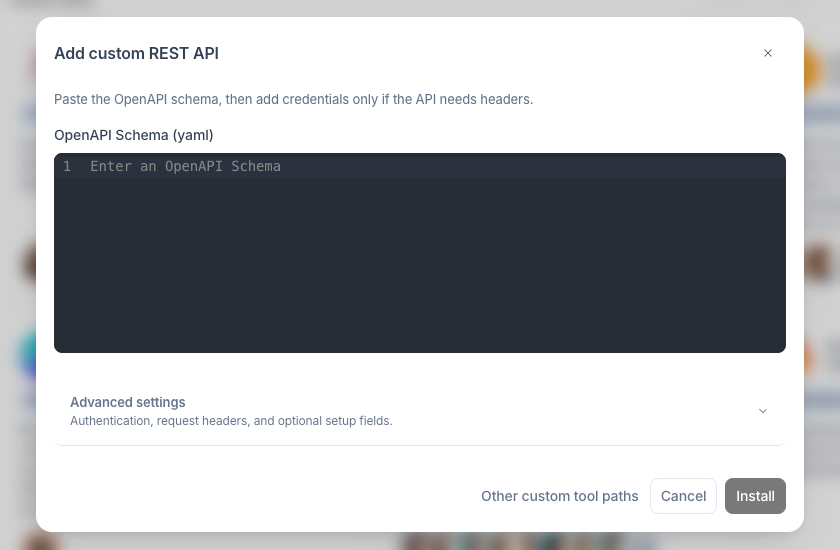
Master the REST API Tool

Master the powerful REST API Tool - the key to unlimited integrations on allmates.ai. Learn how to leverage OpenAPI schemas, explore practical use cases, and unlock custom connections to virtually any external service

Last updated 11 months ago

Understanding the REST API Tool

Among all the tools available on allmates.ai, the REST API Tool stands out as perhaps the most powerful and versatile. While other tools offer specific functionality, the REST API Tool serves as a universal connector that can integrate your Mates with virtually any external service that exposes an API. This extraordinary flexibility transforms your Mates from helpful assistants into custom-built integration specialists tailored to your organization's unique needs.

What is the REST API Tool?

The REST API Tool is essentially a bridge builder - a sophisticated component designed to connect your allmates.ai environment with external services through their REST APIs. Unlike specialized tools that come with predefined functionality, the REST API Tool is infinitely customizable, limited only by the APIs you wish to connect to and your imagination.

At its core, the tool provides a structured way to define external API interactions using the industry-standard OpenAPI specification. This approach offers several distinct advantages:

  • Universal Compatibility: Connect to virtually any modern web service or application that offers a REST API

  • Customized Functionality: Define exactly which API endpoints your Mates can access and how they should interact with them

  • Structured Interactions: Provide clear guidelines for how your Mates should form requests and interpret responses

  • Secure Authentication: Safely manage API credentials through allmates.ai's secure credential storage system

In essence, the REST API Tool transforms your Mates into specialized integration agents capable of retrieving data from, and sending commands to, external systems. This capability opens up countless possibilities for automation, data retrieval, and system integration.

OpenAPI Schema Basics

The REST API Tool relies on OpenAPI (formerly known as Swagger) - an industry-standard specification for describing REST APIs in a machine-readable format. Understanding the basics of OpenAPI schemas is essential for effectively configuring your REST API Tool instances.

What is OpenAPI?

OpenAPI is a specification that allows you to describe your API's endpoints, operations, parameters, responses, and authentication methods in a standardized format. This description serves as a contract between your Mate and the external service, ensuring that requests are properly formatted and responses are correctly interpreted.

The specification typically uses YAML (or alternatively JSON) syntax and follows a structured format that includes:

  • API Information: Basic details about the API, including title, version, and description

  • Servers: The base URLs where the API can be accessed

  • Paths: The available endpoints and their supported operations (GET, POST, PUT, DELETE, etc.)

  • Components: Reusable objects like schemas, parameters, and security definitions

  • Security: Authentication methods required by the API

Key Components of an OpenAPI Schema

Let's explore the essential elements you'll need to understand when creating an OpenAPI schema for the REST API Tool:

1. Basic Information Section

Every OpenAPI document begins with metadata about the API itself:

openapi: 3.0.0
info:
  title: Weather API
  description: API to retrieve weather forecasts and current conditions
  version: 1.0.0

2. Server Information

This section defines where the API can be accessed:

servers:
  - url: https://api.weatherservice.com/v1
    description: Production server

3. Paths and Operations

Paths define the endpoints of your API and the operations (HTTP methods) they support:

paths:
  /current:
    get:
      summary: Get current weather
      description: Returns current weather conditions for a location
      operationId: getCurrentWeather
      parameters:
        - name: location
          in: query
          description: City name or coordinates
          required: true
          schema:
            type: string

4. Response Definitions

These describe what the API returns for each operation:

      responses:
        '200':
          description: Successful operation
          content:
            application/json:
              schema:
                type: object
                properties:
                  temperature:
                    type: number
                  condition:
                    type: string
                  humidity:
                    type: number

5. Security Schemes

These define how authentication should be handled:

components:
  securitySchemes:
    ApiKeyAuth:
      type: apiKey
      in: header
      name: X-API-Key

LLM-Friendly Schema Design

When creating OpenAPI schemas for use with allmates.ai, it's important to design them with Large Language Models (LLMs) in mind:

  • Clear Descriptions: Include detailed descriptions for all operations, parameters, and responses

  • Meaningful Operation IDs: Use descriptive operation IDs that clearly indicate what the operation does

  • Parameter Guidance: Provide examples and constraints for parameters

  • Response Examples: Include example responses to help the LLM understand what to expect

For instance, adding examples and detailed descriptions helps the Mate understand how to use the API effectively:

parameters:
  - name: location
    in: query
    description: |
      City name, postal code, or coordinates for the weather lookup.
      
      ## For LLMs
      - Accept formats: city name, postal code, or latitude,longitude
      - This parameter is MANDATORY
      - Do not invent locations unless explicitly provided by the user
    required: true
    schema:
      type: string
    examples:
      city:
        value: "New York"
      coordinates:
        value: "40.7128,-74.0060"

Use Cases and Examples

The versatility of the REST API Tool enables a wide range of applications across different industries and departments. Let's explore some practical use cases with example implementations:

Customer Relationship Management

Use Case: Connect your Mates to your CRM system to retrieve customer information, update records, and create new entries.

Example Implementation:

paths:
  /customers/{customerId}:
    get:
      operationId: getCustomerDetails
      summary: Retrieve customer details
      description: |
        Gets detailed information about a specific customer.
        
        ## For LLMs
        - Use this to access contact information, purchase history, and account status
        - The customerId must be a valid ID from the CRM system
        - Do not make up customer IDs
      parameters:
        - name: customerId
          in: path
          description: |
            Unique identifier for the customer.
            
            ## For LLMs
            - This is the customer's unique ID in the CRM system
            - Format is typically alphanumeric (e.g., "CUST12345")
            - This parameter is MANDATORY
          required: true
          schema:
            type: string

With this integration, a sales team member could ask their Mate: "What's the contact information for customer ABC123?" and receive complete details instantly, without leaving the conversation.

Project Management

Use Case: Integrate with project management tools to create tasks, update statuses, and retrieve project timelines.

Example Implementation:

paths:
  /projects/{projectId}/tasks:
    post:
      operationId: createProjectTask
      summary: Create a new task
      description: |
        Creates a new task within a specific project.
        
        ## For LLMs
        - Use this to create tasks that will be assigned to team members
        - The projectId must be valid and existing
        - All dates should be in YYYY-MM-DD format
        - Verify the assignee exists before creating the task
      requestBody:
        required: true
        content:
          application/json:
            schema:
              type: object
              properties:
                title:
                  type: string
                  description: |
                    Title of the task.
                    
                    ## For LLMs
                    - Keep titles concise and descriptive
                    - Maximum 100 characters
                description:
                  type: string
                  description: |
                    Detailed description of the task.
                    
                    ## For LLMs
                    - Include all relevant details needed to complete the task
                    - Can include markdown formatting
                assignee:
                  type: string
                  description: |
                    Username of the person assigned to the task.
                    
                    ## For LLMs
                    - Must be a valid username in the system
                    - Do not invent usernames
                dueDate:
                  type: string
                  format: date
                  description: |
                    Due date for the task.
                    
                    ## For LLMs
                    - Use YYYY-MM-DD format
                    - Must be a future date
                    - Confirm date with user before submitting

This allows team members to create new tasks directly through conversations with their Mates: "Create a task for Sarah to complete the Q3 report by next Friday."

Data Analytics

Use Case: Connect to analytics platforms to retrieve key metrics and generate reports.

Example Implementation:

paths:
  /analytics/dashboard:
    get:
      operationId: getDashboardMetrics
      summary: Retrieve dashboard metrics
      description: |
        Gets key performance indicators and metrics for the specified time period.
        
        ## For LLMs
        - Use this endpoint to retrieve analytical data for reports and insights
        - Multiple parameters can be combined for more specific filtering
        - Results will include charts and graphs when available
        - Time-based comparisons are automatically included when a timeframe is specified
      parameters:
        - name: timeframe
          in: query
          description: |
            Time period for the metrics.
            
            ## For LLMs
            - Valid values: "daily", "weekly", "monthly", "quarterly"
            - If not specified, defaults to "monthly"
            - For year-over-year comparison, specify the same timeframe in consecutive requests
          schema:
            type: string
            enum: [daily, weekly, monthly, quarterly]
        - name: department
          in: query
          description: |
            Filter metrics by department.
            
            ## For LLMs
            - Use exact department names as they appear in the organization
            - Case-sensitive parameter
            - Leave empty to include all departments
            - For multiple departments, make separate API calls
          schema:
            type: string
        - name: region
          in: query
          description: |
            Geographic region for filtering metrics.
            
            ## For LLMs
            - Standard regions: "North", "South", "East", "West", "Central"
            - International regions use country codes (e.g., "UK", "FR", "JP")
            - Can be combined with other filters for more specific results
            - Case-sensitive parameter
          schema:
            type: string
      responses:
        '200':
          description: Successful operation
          content:
            application/json:
              schema:
                type: object
                properties:
                  metrics:
                    type: array
                    items:
                      type: object
                      properties:
                        name:
                          type: string
                        value:
                          type: number
                        trend:
                          type: string
                        changePercent:
                          type: number

A manager could simply ask: "Show me the quarterly sales metrics for the East region" and receive a comprehensive report.

Social Media Management

Use Case: Monitor social media engagement, schedule posts, and analyze performance.

Example Implementation:

paths:
  /social/posts:
    post:
      operationId: schedulePost
      summary: Schedule a social media post
      description: |
        Schedules a post to be published on specified social media platforms at the given time.
        
        ## For LLMs
        - Use this endpoint to plan and schedule future social media content
        - Each platform has different character limits and media support
        - Always confirm the scheduling time with the user before submission
        - Preview functionality is not available through this API
      requestBody:
        required: true
        content:
          application/json:
            schema:
              type: object
              properties:
                content:
                  type: string
                  description: |
                    Text content of the social media post.
                    
                    ## For LLMs
                    - Character limits: Twitter (280), LinkedIn (3000), Facebook (63206), Instagram (2200)
                    - Hashtags should be included in the content
                    - URLs will be automatically shortened
                    - Emoji are supported and encouraged for engagement
                platforms:
                  type: array
                  items:
                    type: string
                    enum: [twitter, facebook, instagram, linkedin]
                  description: |
                    List of platforms where the post should be published.
                    
                    ## For LLMs
                    - At least one platform must be specified
                    - Valid values: "twitter", "facebook", "instagram", "linkedin"
                    - Case-sensitive values
                    - If the user mentions a platform not in this list, suggest alternatives
                mediaUrls:
                  type: array
                  items:
                    type: string
                  description: |
                    URLs of media to attach to the post.
                    
                    ## For LLMs
                    - Only publicly accessible URLs are supported
                    - Maximum attachments: Twitter (4), Instagram (10), Facebook (10), LinkedIn (9)
                    - Supported formats: JPG, PNG, GIF, MP4
                    - File size limits apply based on platform
                scheduledTime:
                  type: string
                  format: date-time
                  description: |
                    Date and time when the post should be published.
                    
                    ## For LLMs
                    - Use ISO 8601 format (YYYY-MM-DDTHH:MM:SSZ)
                    - Must be a future time (at least 10 minutes ahead)
                    - Times are in UTC
                    - Confirm the exact time with the user before scheduling
                    - Consider time zones when discussing with users
      responses:
        '201':
          description: Post scheduled successfully
          content:
            application/json:
              schema:
                type: object
                properties:
                  postId:
                    type: string
                  scheduledTime:
                    type: string
                    format: date-time
                  platforms:
                    type: array
                    items:
                      type: string

Marketing teams could work with their Mates to plan and schedule social media content: "Schedule a post about our new product launch for Twitter and LinkedIn next Tuesday at 10 AM."

Integration Possibilities

The REST API Tool unlocks virtually limitless integration possibilities. Here are some of the most powerful ways organizations are leveraging this capability:

Enterprise System Integration

Connect your Mates with your organization's existing enterprise systems:

  • ERP Systems: Access inventory levels, order statuses, and financial data

  • HR Platforms: Retrieve employee information, manage time-off requests, and access company policies

  • Knowledge Bases: Search internal documentation and retrieve relevant information

  • Ticketing Systems: Create, update, and track support tickets

These integrations create a seamless flow of information between your allmates.ai environment and your core business systems, making your Mates truly integrated members of your digital ecosystem.

Industry-Specific Applications

Different industries can leverage specialized integrations:

  • Healthcare: Connect to patient management systems, medication databases, or scheduling systems

  • Finance: Integrate with market data providers, portfolio management tools, or compliance databases

  • Education: Link to learning management systems, student information databases, or academic resources

  • Retail: Connect to inventory systems, e-commerce platforms, or supply chain management tools

By tailoring integrations to industry-specific needs, organizations can address their unique challenges and opportunities.

Custom Workflow Automation

Create sophisticated workflows that span multiple systems:

  • Multi-step Processes: Design sequences that retrieve information from one system, process it, and update another system

  • Conditional Logic: Implement decision trees that take different actions based on specific conditions

  • Scheduled Operations: Set up regular data retrieval, reporting, or system updates

  • Event-driven Actions: Configure responses to specific triggers or events

These automated workflows can dramatically reduce manual effort and ensure consistent execution of complex processes.

Best Practices for Successful Integrations

To maximize the value of your REST API Tool integrations:

  1. Start with Clear Objectives: Define exactly what you want to accomplish with each integration

  2. Understand the Target API: Thoroughly review the API documentation before creating your OpenAPI schema

  3. Begin Simple, Then Expand: Start with basic functionality and add complexity as you gain confidence

  4. Test Thoroughly: Verify all operations with various inputs before deploying to production

  5. Document Your Custom Tools: Create clear usage guidelines for your team

  6. Monitor Performance: Keep an eye on API rate limits and response times

  7. Maintain Security: Regularly review and update authentication credentials

By following these practices, you'll create robust, reliable integrations that enhance your Mates' capabilities and deliver real value to your organization.

Next Steps

Now that you understand the power and potential of the REST API Tool, you're ready to begin creating your own custom integrations:

  1. Identify Integration Opportunities: Consider which external services would most benefit your workflows

  2. Gather API Documentation: Collect the necessary information about the APIs you want to connect to

  3. Create Your First OpenAPI Schema: Start with a simple schema focusing on the most valuable endpoints

  4. Configure a REST API Tool Instance: Apply what you've learned to set up your first custom integration

In the article, "Securing Your Tools," we'll explore how to properly manage credentials and ensure your integrations remain secure and reliable.