Introduction to Tools

Tools are specialized extensions that enhance your Mates' capabilities, allowing them to perform a wide range of tasks and interact with external services. Think of them as superpowers that you can give to your virtual collaborators to make them even more effective.

Last updated 11 months ago

Introduction

In today's fast-paced digital environment, efficiency and automation are key to staying competitive. That's why allmates.ai has developed a powerful system of Tools that can transform your Intelligent Virtual Agents from helpful assistants into specialized productivity powerhouses. These Tools serve as extensions that dramatically enhance what your Mates can accomplish, allowing them to connect with external services and perform complex tasks with minimal effort.

What are Tools?

Tools on allmates.ai represent the bridge between your virtual collaborators and the wider digital world. They are specialized integrations designed to expand your Mates' capabilities far beyond basic conversation.

Think of Tools as superpowers you can grant to your Mates. Just as a smartphone becomes more valuable with each app you install, your Mates become more powerful and versatile with each Tool you add to their arsenal. These integrations enable your virtual team members to:

  • Access external services and APIs - connecting your Mates to the services and platforms your organization already uses

  • Retrieve real-time data - ensuring your team always has the most current information available

  • Perform specialized tasks - from generating images to analyzing documents

  • Automate complex workflows - handling multi-step processes that would otherwise require human intervention

The practical impact is immediate and transformative. A Mate equipped with the Weather API Tool can provide detailed forecasts for any location worldwide, helping your team plan activities with confidence. Another Mate using the URL Scraper Tool can extract and analyze content from websites, turning the entire internet into an accessible knowledge base.

Benefits and Capabilities

The strategic implementation of Tools within your allmates.ai environment creates numerous advantages that directly impact productivity and innovation.

Enhanced Productivity

Tools dramatically streamline workflows by automating routine tasks and providing instant access to information:

  • Task Automation: Free your team from repetitive processes by allowing Mates to handle them autonomously. Whether it's data collection, report generation, or information distribution, Tools can execute these tasks consistently and efficiently.

  • Real-time Information: Make decisions based on current data by giving your Mates the ability to retrieve up-to-date information from authoritative sources. This eliminates delays and ensures everyone works with the same accurate information.

  • Seamless Integration: Maintain workflow continuity by connecting with external services without leaving your conversations. This creates a unified experience where information flows naturally between systems.

Customization

The flexibility of the Tools system allows you to create a tailored experience for each team and project:

  • Role-Based Tool Assignment: Equip each Mate with specific tools aligned with their responsibilities. Your research Mate might need web search capabilities, while your project management Mate could benefit from calendar and task management tools.

  • Custom Workflow Creation: Design processes that match your team's unique needs by combining different tools in strategic ways. This ensures your virtual assistants work in harmony with your established procedures.

  • Scalable Capabilities: Start with essential tools and expand as your requirements evolve. The modular nature of the Tools system means you can add functionality incrementally without disrupting existing workflows.

Practical Applications

The versatility of Tools enables a wide range of practical applications across different departments and industries:

  • Creative Teams can generate images using AI, transforming text descriptions into visual concepts within seconds

  • Research Teams can search the web for current information, ensuring reports and analyses incorporate the latest findings

  • Analysts can extract data from websites, gathering competitive intelligence or market trends efficiently

  • IT Departments can connect to existing business tools, creating a unified ecosystem that leverages current investments

  • Developers can create custom integrations with any REST API, extending functionality to virtually any digital service

The Tools Ecosystem

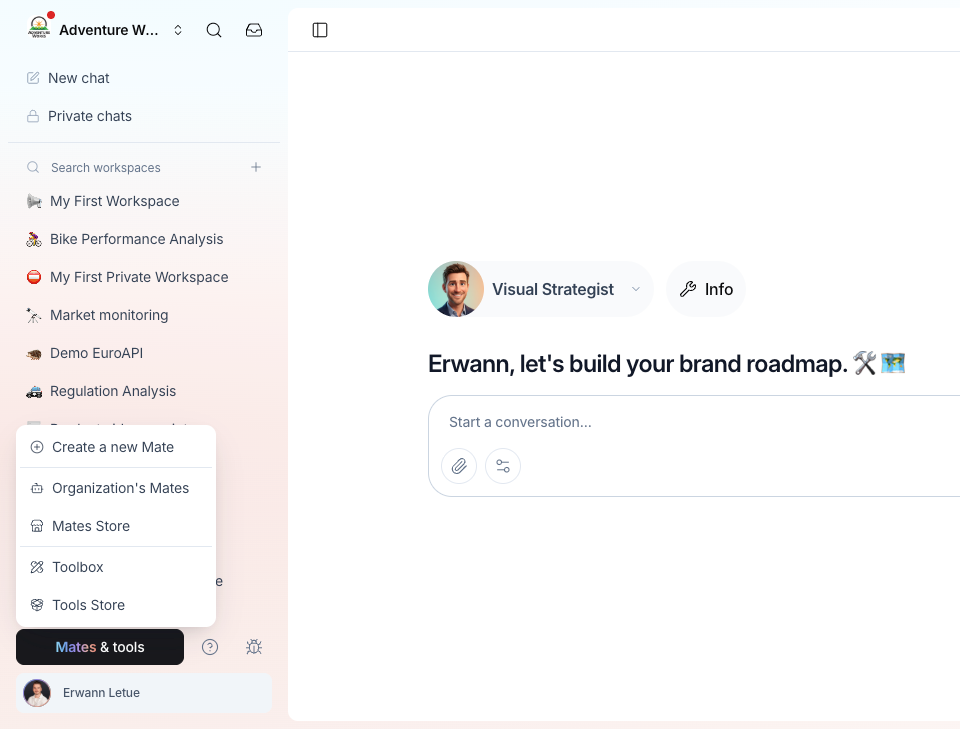
To help you navigate and manage your Tools effectively, allmates.ai provides two complementary environments: the Tool Store and the Toolbox.

Tool Store

The Tool Store serves as your centralized marketplace for discovering and accessing the full range of available tools. This carefully curated collection offers:

  • Diverse Selection: Browse through a growing library of pre-built tools designed to address common business needs

  • Detailed Information: Each tool includes comprehensive descriptions and capability overviews

  • Clear Instructions: Easy-to-understand usage guidelines help you implement tools quickly

  • Continuous Expansion: Regular updates introduce new tools and enhance existing ones

Among the most popular offerings in the Tool Store are:

  • REST API Tool - The ultimate customization option, allowing integration with virtually any service that offers an API

  • Weather API Tool - Providing detailed weather data and forecasts for locations worldwide

  • URL Scraper - Extracting and analyzing content from websites for research and monitoring

  • Image Generation Tool - Creating original visual content based on text descriptions

Toolbox

While the Tool Store is where you discover new possibilities, the Toolbox is where you manage your active implementations. This personal management center allows you to:

  • Organize Instances: Keep track of all your active tool configurations in one convenient location

  • Adjust Settings: Fine-tune tool parameters to match your specific requirements

  • Monitor Performance: Track how your tools are being used and ensure they're functioning optimally

  • Update Configurations: Modify credentials or settings as your needs change

The relationship between these two environments is straightforward: the Tool Store is where you shop for capabilities, and the Toolbox is your workshop where you maintain and organize the tools you've chosen to implement.

Next Steps

Now that you understand the fundamentals of the Tools system on allmates.ai, you're ready to begin enhancing your Mates' capabilities:

  1. Explore the Tool Store to discover the full range of available tools and identify those that align with your objectives

  2. Identify which tools would benefit your workflows by considering your team's routine tasks and information needs

  3. Learn how to create and configure tool instances by continuing to our article: "Discovering the Tool Store "

By thoughtfully implementing Tools, you'll transform your Mates from helpful assistants into indispensable team members capable of handling complex tasks and providing valuable insights exactly when you need them.