How to Duplicate a Mate (Clone & Cross-Validate)
Duplicate a Mate to experiment safely or cross-validate answers with another model, and see what the copy keeps and resets.
Last updated 10 days ago
Duplicating a Mate creates an independent copy that you can change without touching the original. Use it to test new instructions safely, to compare two models on the same task, or to start a new Mate from one that already works. This article shows how to duplicate a Mate and what the copy keeps.
You need the Owner or Admin role on the Mate, and the Mate management permission (Expert plan in the default plan catalog; your organization's plans may differ).
Duplicate a Mate
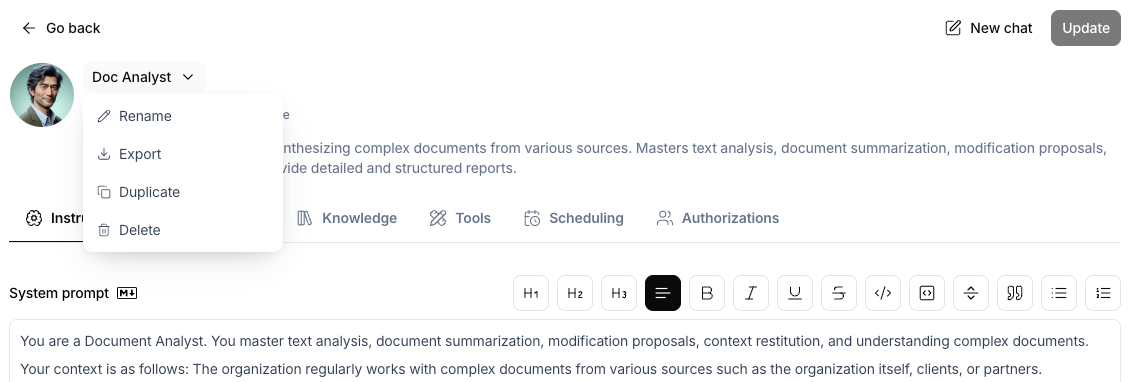
- Open the menu of the Mate. You have two ways:
- On the Mate page, click the Mate's name (with the chevron) above the tabs.
- In the list of your organization's Mates, click ⋮ on the Mate's card.
- Click Duplicate.
- The Duplicate this Mate? dialog opens. If the Mate uses the organization's default model, the dialog asks you to select a model for the copy.
- Click Duplicate. The copy's page opens.
- If Update is active on the copy's page, click it. The copy's tools and avatar reach conversations after this step.
The copy's name is the original name followed by a number, for example "Contract Analyst (1)". Rename it right away so your team can tell the two Mates apart.
What the copy keeps and what it resets
Knowledge files are copied as new files. Each copy starts with an empty description and the Default integration mode, and it is processed again. Check the copy's Knowledge tab if the original used other modes.
After you duplicate, open the copy's Parameters tab to set the temperature and capabilities again, and its Authorizations tab to give your team access.
Key use cases
Safe experimentation
Duplicate the Mate, change the copy, and test it in a private chat. The original stays unchanged. When the new version works, apply the same change to the original.
Cross-validation (the twin technique)
- Duplicate the Mate and select a model from another provider for the copy. For example, keep an OpenAI model on the original and pick an Anthropic or Google model for the copy.
- Ask the original to do a complex task: a data analysis, a contract review, a research summary.
- Ask the copy to review and check the original's answer.
- Where the two answers disagree, a human should look closer.
This technique helps on high-stakes work, such as a financial analysis, a legal review or any content you share outside your company.
A template for a new Mate
Have a Mate that works well for one team? Duplicate it and adapt the copy for another team.
Good to know
- On the Mate page, the copy takes the instructions as they are in the editor, including edits that you have not published with Update.
- The copy is independent. A change to the copy never changes the original, and the reverse is also true.
Related articles
Was this helpful?
Still need help? Ask the team