Prefill Editor via URL
Learn how to create links that start conversations with pre-filled text
Last updated 14 days ago
🚀 What is Prefilling?
Prefilling allows you to create special links that automatically populate the chat editor in allmates.ai with a specific message or question. This is a powerful way to streamline workflows and guide users to specific tasks.
Use it to:
🔗 Share Quick-Start Links: Onboard new team members with a link that asks a welcome question.
❓ Create FAQ Bookmarks: Save links that pre-fill frequently asked questions to your Mates.
🤖 Integrate with Other Tools: Create buttons in your internal wiki, CRM, or other applications that launch allmates.ai with pre-filled context for a Mate to act on.
🛠️ How It Works: The q Parameter
To pre-fill a message, add the ?q= parameter to your organization's allmates.ai URL, followed by your desired text.
Basic Structure:
https://app.allmates.ai/o/YOUR-ORG-SLUG/?q=your%20message%20hereReplace
YOUR-ORG-SLUGwith your organization's unique identifier.Replace
your%20message%20herewith your URL-encoded text.
URL Encoding
Some characters (like spaces, ?, &, #) need to be encoded to work correctly in a URL.
A space becomes
%20A question mark
?becomes%3FA hashtag
#becomes%23
💡 Tip: You don't have to do this manually! Use a free online tool like urlencoder.org to automatically encode your message.
Examples
🎯 Pre-selecting a Mate: The agentId Parameter
You can also ensure the message is directed to a specific Mate by adding the &agentId= parameter. This is perfect for launching a conversation with the right expert from the start.
Structure:
https://app.allmates.ai/o/YOUR-ORG-SLUG/?agentId=MATE_IDReplace
MATE_IDwith the unique ID of your Mate.
You can find a Mate's ID in the Mate's configuration settings page.
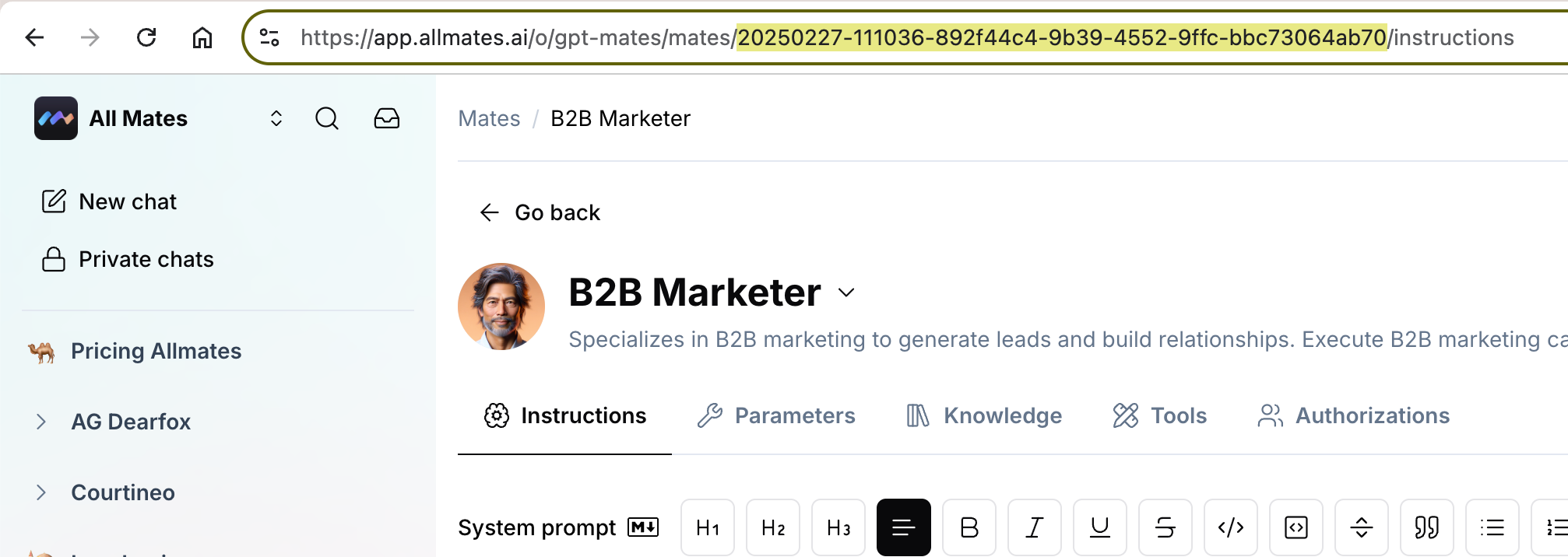
✨ Combining Parameters
To both pre-select a Mate and pre-fill a message, simply combine both parameters using an ampersand (&).
Structure:
https://app.allmates.ai/o/YOUR-ORG-SLUG/?agentId=MATE_ID&q=your%20message%20hereExample:
To ask the \"Sales-Assistant\" Mate (ID: xyz-123) to find a customer, your link would look like this:
https://app.allmates.ai/o/my-company/?agentId=xyz-123&q=Find%20customer%20John%20Doe📌 Key Things to Remember
Not Sent Automatically: The message is only pre-filled in the editor. The user still needs to press \"Send\".
URL Length: For best compatibility across all browsers, try to keep the total URL length under 2000 characters.
Works on Main Chat Page: This feature works best when linking to your organization's main chat page.
Was this helpful?
Still need help? Ask the team