Mastering Hidden Messages: Optimize Context
Exclude a message from the context so your Mates stop reading it while your team still sees it.
Last updated About 13 hours ago
Hidden messages let you choose what your Mates read in a conversation. When you exclude a message from the context, the Mates no longer read it. Every person in the conversation still sees it. Use this feature to keep a Mate focused on what matters, while your team keeps the full history.
Exclude a message from the context
On a computer:
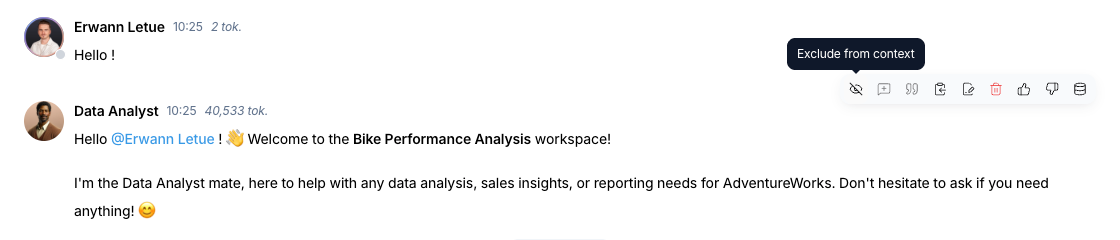
- Move the pointer over the message. An action bar appears at the top right of the message.
- Click the crossed-out eye icon. Its tooltip reads Exclude from context.
- The message fades. From now on, the Mates of the conversation do not read it.
On a phone or a tablet:
- Tap the ⋯ button of the message. The Actions menu opens.
- Tap Exclude from context.
Include a message in the context again
- Move the pointer over the faded message, or tap its ⋯ button on a touch screen.
- Click the eye icon. Its tooltip reads Include in context.
- The message shows at full opacity again. The Mates read it again in their next answers.
What changes when you exclude a message
- The Mate does not read the message, so it does not add to the context of the next answers.
- The message stays in the conversation. It is not deleted, and you can include it again at any time.
- The change applies to everyone. All people in the conversation see the faded message, and no Mate of the conversation reads it.
- The change applies to the next answers only. Answers that a Mate already gave do not change.
When to exclude a message
After a Mate processes a large file
You upload a large document and ask a Mate to analyze it. When you have the result you need, exclude the message that carries the file. The next answers build on the analysis, and the Mate does not read the full document again at each turn.
Iterative refinement
You work with a Mate through several drafts of a text, a piece of code or an image. When you reach the final version, exclude the earlier drafts and corrections. The Mate then refers only to the version that you approved.
Compare two Mates without bias
You want the opinion of two Mates on the same question, and the second one must not see the first answer.
- Ask the first Mate your question.
- When it answers, exclude its answer from the context.
- Ask the same question and mention the second Mate with
@. - When the second Mate answers, include the first answer in the context again.
You can now compare both answers, or discuss them with the Mates or your team.
An off-topic discussion
A conversation drifts to a side topic that is useful for the people but not for the main goal. Exclude the messages of that side topic. The Mate stays focused on the main goal, and the side discussion stays in the history for your team.
When not to exclude a message
Do not exclude a message that holds instructions, decisions or facts that a Mate needs later. If the Mate cannot read that information, its answers can become incomplete or confused.
Good to know
- Any member who can write in the conversation can exclude or include any message, including the messages of other people. Members with the Viewer role do not see the message actions.
- A message that shows an error has no Exclude from context action.
- Excluding a message does not delete it. To remove a message for everyone, use Delete message. See Managing Messages in Your Conversations below.