Understanding and Using Notifications
See what sends you a notification, where it shows, and how to read, archive and filter your Inbox.
Last updated 10 days ago
Notifications keep you informed when your human and AI teammates need you. allmates.ai notifies you when someone mentions you, when a scheduled Mate run ends, when your role on a Mate or a tool changes, and when a workspace that you own becomes private. This guide explains what sends a notification, where you see it, and how to use the Inbox.
What sends you a notification
About mentions
An active mention uses the @ symbol followed by your name, for example @Jane Doe. It sends you a notification. A passive mention (@@) does not.
You get no notification when you have the conversation open in front of you at that moment. This prevents alerts for conversations that you already follow in real time. You also get no notification when you mention yourself.
Where you see your notifications
- Banner in the app: when a new notification arrives, a banner appears in the app. It disappears after a few seconds. Click the banner to open the related conversation or page, or click X to close it.
- Browser notification: when the allmates.ai tab is open but not in focus, your browser can also show the notification. You must allow this first. See How to Enable and Troubleshoot Notifications.
- Unread badges: a red badge with a number appears next to each conversation that has unread mentions or scheduled-run results. A collapsed workspace or folder in the sidebar shows the total of the conversations inside it.
- Inbox: the Inbox icon at the top of the sidebar shows a red badge with the number of unread notifications. Above 99, the badge reads "99+".
Use the Inbox
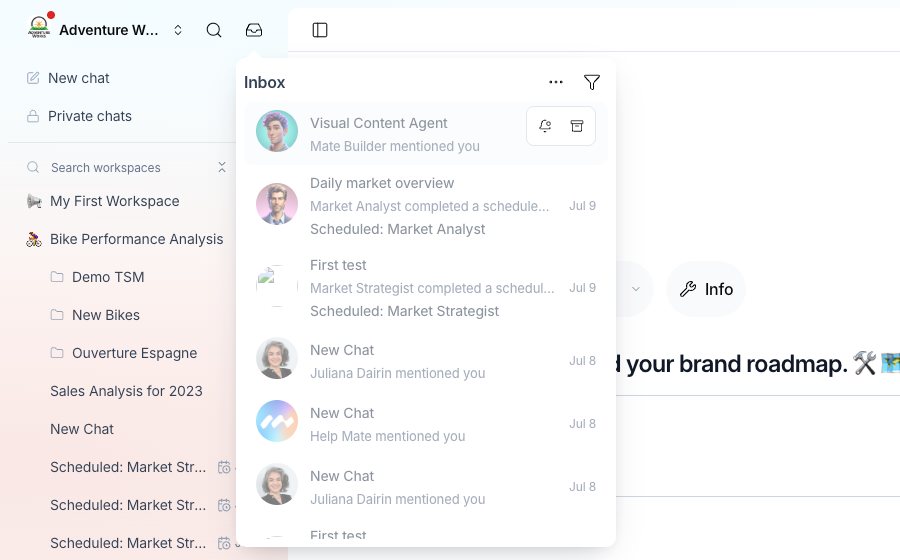
The Inbox collects all your notifications for the organization that you have open.
- At the top of the sidebar, next to the search icon, click the Inbox icon (a tray).
- The Inbox opens. The newest notifications come first. Unread notifications show in bold, with a blue dot.
- Click a notification. It is marked as read, and the app opens the related page: the conversation for a mention or a scheduled run, the Mate or the tool for a new role, or the workspace that became private.
Manage one notification
Move the pointer over a notification to show its actions:
- Mark as read or Mark as unread.
- Archive moves the notification out of the main list. Unarchive brings it back.
Manage all notifications
Click the ⋯ button at the top of the Inbox:
- Mark all as read marks every unread notification as read.
- Archive all archives every notification of the current list.
Filter the list
Click the filter icon at the top of the Inbox. Under Status, select one option:
- Unread & read shows all notifications that are not archived. This is the default list.
- Unread shows only the notifications that you have not read.
- Archived shows only the archived notifications.
When the list is empty, the Inbox shows "No notifications".
Why notifications help your team
- Work at your own pace. Schedule a Mate and move on to other work. The Inbox tells you when the run ends, and whether it succeeded.
- Bring a colleague in. Mention a colleague to ask for a review, an input or a handover. They get the notification even if they are in another conversation.
- One place for humans and Mates. Mentions from people and from Mates reach the same Inbox.
Good to know
- Opening a conversation marks its mentions and scheduled-run notifications as read after a short moment.
- Notifications belong to an organization. If you belong to several organizations, switch organization to see the Inbox of the other one.
- The first time you open the Inbox, a prompt at the top offers to enable browser notifications. See How to Enable and Troubleshoot Notifications.
- The app shows notifications while it is open in a browser tab. allmates.ai does not send notifications when the app is closed. The Inbox keeps them until you come back.
Related articles
Was this helpful?
Still need help? Ask the team