Sharing a conversation with a public link
Create a read-only public link to a conversation, set its expiration, and manage or delete your links.
Last updated About 15 hours ago
A public link lets anyone read a conversation in their browser, without an allmates.ai account. Use it to show a Mate's work to a client, a partner or a colleague outside your organization. The person who opens the link sees a read-only copy of the conversation and can replay it message by message.
You can create a link from a private chat or from a workspace conversation.
Create a link
- Open the conversation.
- At the top right, click the share icon (Share). On a phone, tap the ⋯ menu, then Share.
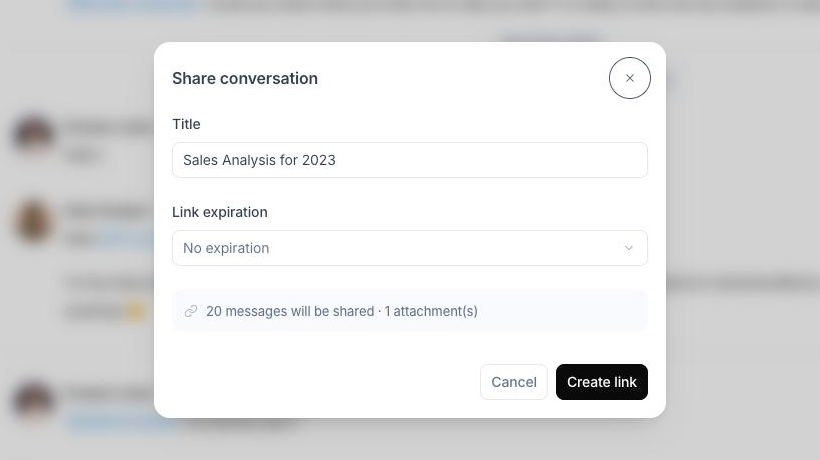
- In the Share conversation dialog, check the Title. It is the conversation name by default. The visitor sees this title.
- Optional: in Link expiration, choose 1 hour, 24 hours, 7 days or 30 days. Leave the field empty for No expiration.
- Read the summary line, for example "12 messages will be shared · 2 attachment(s)".
- Click Create link.
The dialog shows the link and the message "Anyone with this link can view the conversation.". The link is also copied to your clipboard (Link copied!). If your browser blocks the automatic copy, click the copy button (Copy link) next to the link. When you chose an expiration, the dialog also shows "This link expires in" followed by the duration.
The Share button shows only when the conversation has at least one message.
What the link shows
The link shows a copy of the conversation as it was when you created the link:
- The messages that are visible in the conversation at that moment, with their authors.
- The files attached to those messages. The visitor can open them from the shared page.
- The participants of the conversation (Mates and members).
The copy does not change after you create it:
- Messages sent after you created the link do not appear. To share the new messages, create a new link.
- Hidden messages are not included.
- If you edit or delete a message in the conversation, the shared page keeps the old version.
What the visitor sees
The visitor opens a public page with:
- The title, and "Expires" followed by the date if the link has an expiration.
- A copy button (Copy link) to pass the link on.
- The conversation, read-only. The visitor cannot write a message.
- A Conversation Replay button at the bottom. It plays the conversation message by message. The replay controls are Play, Pause, Previous, Next and Skip to end. At the end, Watch again restarts the replay. Exit replay returns to the full conversation.
- For a visitor who is not signed in, a Try allmates.ai button.
If the visitor is signed in to allmates.ai and is a member of the workspace of the conversation, the header also shows Go to chat. It opens the original conversation in the app.
When the link no longer works, the visitor sees one of these pages:
- Link expired: "This shared conversation link has expired."
- Conversation not found: "This shared link doesn't exist or has been removed." This page shows after you delete the link, or when the address is wrong.
Manage your links
Open the Share conversation dialog again. Below the form, the Shared links list shows every link created for this conversation, newest first. For each link, you see:
- the title,
- the creation date and the number of views (for example "3 views"),
- the expiration date, while the link is active,
- an Expired tag when the expiration date has passed.
Two actions are available on each link:
- Copy link: copies the address again. It shows only while the link is active.
- Delete: turns the link off at once. The visitor then sees Conversation not found.
A Revoked tag means the link no longer works but its deletion did not complete. Click Retry deletion.
Good to know
- Only the person who created a link, or an organization Admin or Owner, can delete it. For other members, the deletion fails with "Failed to delete link".
- Workspace members can see the Shared links list of a conversation, including links created by other members.
- Repeated opens from the same browser in a short time count as one view.
- An expired link stays in the list with the Expired tag. Delete it to remove it from the list.
- The link uses the address you sign in to allmates.ai with.
- Anyone who has the link can read the conversation. Share it only with the people who should see the content.