Starting on the free plan
Activate the free plan for a new organization, see your free credits and upgrade when you need more.
Last updated About 13 hours ago
A new organization can start on the free plan. The free plan gives your organization free credits, so your team can try its Mates before it pays. This article shows how to activate the free plan, where to see the free credits and how to upgrade. It is for the Owner or Admin who sets up a new organization.
Activate the free plan
When your organization is new, the app shows a plan step before anything else.
- Sign in to your organization. The page "Start Your Collaborative Agentic AI Hub Today" opens.
- The Free Trial card shows "No credit card required."
- Click Get started today.
- Complete the checkout window. The free plan asks for no credit card.
- The page "Setting up your workspace" shows the setup steps: Configuring AI models, Creating your Mates, Installing tools and Finalizing the environment.
When the setup ends, your organization opens and your team can start to chat with its Mates.
See your free credits
Only organization Owners and Admins see the credits.
- At the top of the sidebar, click your organization's name.
- The Credits card shows the credits left and the credits received.
- Click Manage to open the Plans & billing tab.
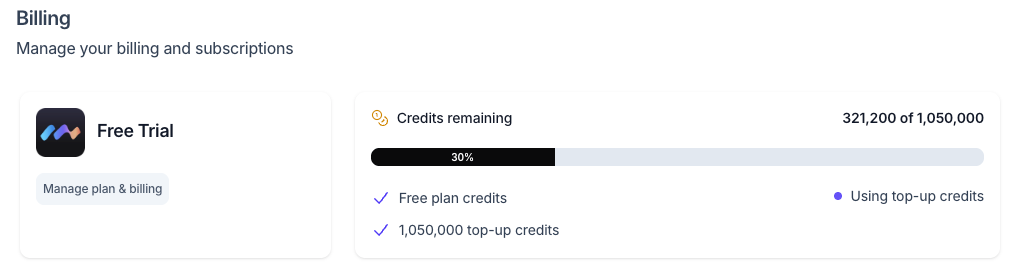
On the Plans & billing tab, the credits card shows Credits remaining and the line Free plan credits. While your organization uses them, the card also shows Using free plan credits.
When the free credits run low
The app warns Owners and Admins when the credits get low. When the credits reach zero, Mates pause for every member until you add credits. See "Understanding credits".
Upgrade from the free plan
You can add credits at any time. You do not need to wait for the free credits to run out.
- Open the Plans & billing tab (organization name > Settings > Plans & billing).
- Choose one of the two options:
- Buy credits: a one-time pack that adds credits to your balance.
- Change subscription: a monthly subscription that gives credits every month.
- Choose the size in the list, check the price on the card, then click the button.
- Complete the checkout window.
For the details of each option, see "Buying credits and managing your subscription".
Good to know
- The free credits belong to the organization. All members use the same balance.
- Members with the User role do not see the credits or the Plans & billing tab.
- With some custom offers, Buy credits is the only upgrade option.
- Top-up credits that you buy on the free plan add to the free credits. The credits card then shows a top-up credits line too.
- A member's plan (for example Expert) sets which features that member can use. It is different from the free plan of the organization. See "Managing Roles, Plans, and Permissions".
Related articles
- Understanding credits
- Buying credits and managing your subscription
- Managing Roles, Plans, and Permissions
- Starting Your First Chat with a Mate
- Creating Your Account