Current lineup
The models your organization can use today, how Latest and pinned models differ, what a deprecated model does, and where to compare models.
Last updated About 6 hours ago
This article lists the language models that your organization can use today. It covers the Allmates models that every organization gets, the models of the other providers, the "Latest" models that update themselves, and what happens when a model is deprecated. It is for everyone who picks a model for a Mate, and for the Admins who add models to the organization.
A Mate can only use a model that your organization has added. Organization Owners and Admins add models in Models management. See "Managing your organization's models".
Allmates models
Every new organization gets ready-to-use connections managed by Allmates. These connections show the by Allmates badge.
The Allmates connection gives three models, already added to your organization:
- Allmates small: the smallest tier.
- Allmates medium: the middle tier. It is the organization default model out of the box, so new Mates start on it.
- Allmates large: the largest tier.
Each Allmates tier stays current. Your Mates keep the same tier and get the improvements with no action from you.
Replies from a Mate consume your organization's credits. A larger model consumes more credits per reply than a smaller one. See "Understanding credits".
Models of other makers
The other connections give access to the models of many makers. An Admin adds each model to the organization with Create model, then Mates can use it.
In Create model, pick a connection with the by Allmates badge, then look for the model in Physical model.
The names are the ones that the Physical model list of the Create model dialog shows. The list can also offer older models, for example GPT-4o, o1 or o3. They stay available for existing setups. They are not part of the current lineup, and we do not recommend them for new Mates.
Like Allmates models, these models consume your organization's credits.
Latest or pinned
Some models have "Latest" in their name, for example "Claude Opus Latest (5.5)". A "Latest" model follows its family. When the maker releases a new version, the "Latest" model moves to it, and the version in parentheses changes. Every Mate on that model moves with it, with no action from you.
A model with a version number, for example "Claude Opus 5.5", is pinned. A Mate on it keeps that exact version until someone changes the model.
Pick a "Latest" model when you want the newest version of a family. Pick a pinned version when you need replies that stay stable over time.
On the writing date, these "Latest" models exist: Claude Fable Latest (5.1), Claude Opus Latest (5.5), Claude Sonnet Latest (5.0), Claude Haiku Latest (4.5), GPT Latest (5.6 Terra), GPT mini Latest (6 Luna), Gemini Pro Latest (v3.1), Gemini Flash Latest (3.8), Gemini Flash Lite Latest (3.5), Grok Latest (4.7) and Mistral Large Latest (v3).
Deprecated models
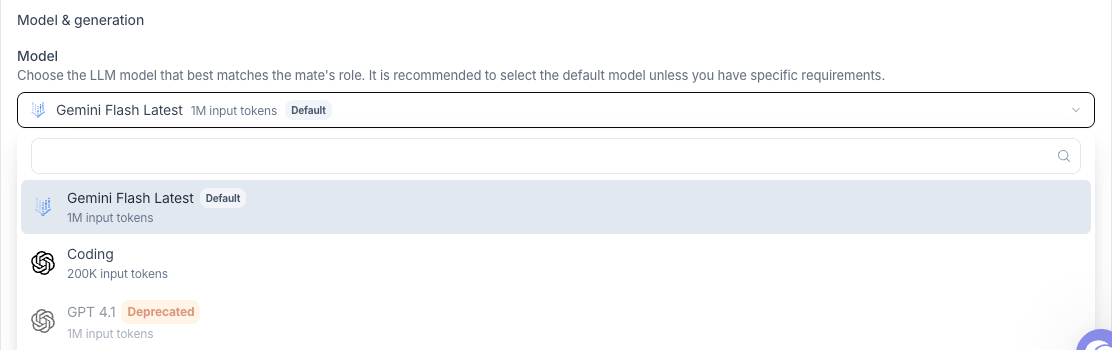
A model that is on its way out shows a Deprecated tag. Hover the tag to read "This item is deprecated and may be removed in the future."
- In a Mate's Model list, a deprecated model is greyed out. You cannot pick it for a Mate.
- A Mate that already uses a deprecated model keeps it. The Deprecated tag shows next to the selected model. Move the Mate to a current model.
- The Create model dialog does not offer deprecated models.
- The Models tab of Models management shows the tag next to the models that use a deprecated model.
How to compare models
Allmates does not publish its own scores. Public pages compare models, and they follow each new release:
- LMArena (now named Arena): rankings from blind votes by users.
- Artificial Analysis: benchmarks of intelligence and speed.
- OpenRouter rankings: the models that people use most through OpenRouter. This is a usage signal. It shows what people use, not a quality score.
In the app, the Model list of a Mate shows the number of input tokens each model accepts. The Thinking row of the Mate shows which thinking effort levels the model offers. The best test is your own task: duplicate the Mate, give each copy a different model, and compare their replies on the same question.
Good to know
- Your organization's list may differ.
- Using your own model provider account is available with the Enterprise offer. See "Using your own model provider keys (BYOK)".
- A model that you do not see in a Mate's Model list is not added to your organization yet. Ask an organization Admin.
- The lineup changes with each model release. The "Latest" models and the Allmates models follow these changes by themselves.
Last verified: 2026-09-25